Why Does Viewing Angle Matter for a Bus LCD Monitor?
A bus LCD monitor needs to be readable from more than one seat. Passengers may view the screen from the front, middle or rear of the cabin, often at different heights and angles. A display that looks clear directly in front of it may appear darker or less distinct from another position.
For bus manufacturers, coach builders and system integrators, viewing angle should therefore be considered together with screen size, mounting position and cabin lighting. These factors determine whether passengers can comfortably watch entertainment content and read onboard information.
What Does Viewing Angle Mean for a Bus LCD Monitor?
Viewing angle describes how far a viewer can move away from the center of a display while the image remains within a specified visual performance threshold. Panel specifications commonly provide horizontal and vertical viewing-angle values.
However, a wide viewing-angle specification does not mean the image looks identical from every direction. Brightness, contrast and color may still change as the viewing position becomes more extreme. Buyers should also check the measurement conditions used in the panel specification.
In a bus or coach, practical visibility depends on the complete installation. The panel characteristics matter, but so do the screen tilt, distance from passengers, reflections and size of the displayed text.
Why Passenger Seating Changes Display Requirements
Unlike a desktop monitor, a coach LCD monitor serves people sitting in multiple rows. Passengers close to the screen may look upward at a relatively steep angle, while passengers farther away may see it more directly but struggle to read small text.
Seats beside the windows also create different horizontal viewing positions. A centrally mounted display must remain useful to passengers on both sides of the aisle.
This makes a front-facing inspection insufficient. During project evaluation, the display should be checked from representative seats throughout the cabin, including positions close to the monitor and toward the rear.
Screen Size and Viewing Angle Solve Different Problems
A larger screen can make text and images easier to see at a distance, but it does not automatically improve off-center visibility.
If the panel loses contrast when viewed from below, increasing screen size may leave nearby passengers with the same problem. Similarly, a wide-viewing-angle panel cannot make very small text readable from the last row.
Screen size, resolution, panel performance and content layout should be evaluated together. For passenger information, short messages and clearly sized text are often more useful than crowded layouts.
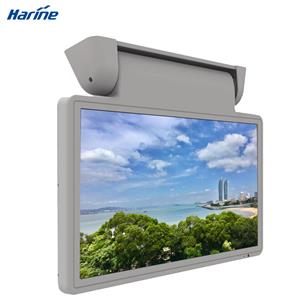
Projects requiring a larger fixed display can review the 21.5 Inch Fixed Bus LCD Monitor and confirm the selected configuration against the intended seating layout.
Mounting Height and Screen Tilt Affect Visibility
A bus LCD monitor mounted close to the ceiling helps preserve cabin space, but its position changes the angle from which passengers see the image.
If the screen faces too far upward or sits behind an interior obstruction, some passengers may have difficulty seeing it. Tilting the display toward the seating area can improve visibility, provided the mounting arrangement allows adjustment and maintains sufficient clearance.
For flip-down monitors, evaluation should use the actual open position. The operating angle needs to suit the cabin layout without interfering with luggage racks, interior fittings or passenger movement.
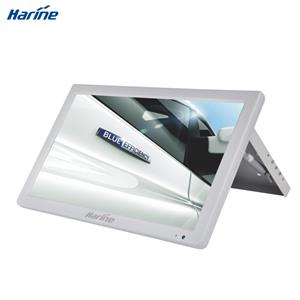
A 15.6 Inch Manual Flip Bus LCD Monitor is one configuration to consider when the screen needs to fold away between uses. Its suitability should be assessed using the installation dimensions and intended viewing positions.
Cabin Lighting Can Reduce Readability
A screen may look clear in a workshop and become harder to read inside a vehicle during daylight.
Light entering through side windows can create reflections or reduce perceived contrast. Increasing display brightness may help in some conditions, but brightness alone cannot resolve every reflection problem.
The monitor position, screen surface and surrounding lighting should be reviewed together. Where practical, avoid mounting arrangements that place strong window reflections directly across the main viewing area.
Content also matters. High-contrast text, uncluttered backgrounds and sufficiently large characters can improve readability. Passenger messages should be tested under both daytime and nighttime conditions.
Entertainment and Passenger Information Need Different Checks
For coach entertainment, evaluation should include video scenes with both bright and dark areas. Buyers can check whether passengers at different seats can distinguish details without excessive changes in color or contrast.
For passenger information, text readability is the priority. Route details, announcements and safety messages should remain clear at the intended viewing distance.
A monitor may perform well when showing full-screen video but become less useful when the same display is divided into several small information panels. Testing should therefore use representative content rather than only a demonstration image.
What Should Buyers Confirm Before Ordering?
Before selecting a bus LCD monitor, provide the supplier with the intended mounting location, seating layout, screen size, viewing distance and main content type.
Ask for the panel’s horizontal and vertical viewing-angle specifications, including the stated measurement conditions. Also confirm brightness, resolution, mounting dimensions and any available installation adjustments.
For an initial vehicle project, evaluating a sample in a representative cabin can reveal issues that are difficult to identify from a specification sheet. Check the display from both sides of the aisle, nearby seats and the rear seating area.
The aim is to confirm passenger visibility before finalizing the display configuration and installation design.
FAQ
Is a wide viewing angle important for a bus LCD monitor?
Yes. Passengers view a bus display from different seats, so off-center visibility matters. However, viewing angle should be assessed alongside mounting position, brightness, screen size and content readability.
Does a larger coach monitor provide a wider viewing angle?
No. Screen size and viewing angle are separate characteristics. A larger screen may improve visibility at a distance, while off-center image performance depends on the panel and installation.
Can screen tilt improve passenger visibility?
An appropriate tilt can improve the viewing position for passengers. The final angle should be checked in the vehicle, considering nearby seats, rear rows, installation clearance and cabin fittings.
Is brightness more important than viewing angle?
Both matter. Brightness affects visibility under ambient light, while viewing angle affects image appearance from different positions. Neither specification should be evaluated on its own.
How can a bus display be tested before bulk purchasing?
Install a sample in a representative position and inspect it from several passenger seats. Use the intended video and information content, and check readability under daytime and nighttime lighting.