Why Does Vibration Resistance Matter for a Bus LCD Monitor?
Why Does Vibration Resistance Matter for a Bus LCD Monitor?
A bus LCD monitor operates in an environment that changes throughout every journey. Road surfaces, acceleration, braking and vehicle movement expose the display and its mounting assembly to repeated mechanical stress.
For bus manufacturers and fleet operators, vibration resistance therefore involves more than protecting the LCD panel. It also concerns mounting stability, electrical connections and the ability of the complete display assembly to remain secure during daily service.
How Does Vehicle Vibration Affect an Onboard Display?
A monitor installed inside a coach moves with the vehicle body. Uneven roads and normal driving conditions transmit movement through the mounting structure to the display enclosure.
Depending on the installation, repeated vibration can contribute to loose fasteners, movement around mounting points or stress on unsupported cables. These issues may first appear as rattling, visible screen movement or an intermittent connection.
The overall installation matters as much as the monitor itself. A display with a suitable enclosure still needs a properly designed mounting location, appropriate fastening methods and supported cable routing.
Why Does Mounting Stability Matter?
A roof mounted bus monitor depends on the structure supporting it. The mounting arrangement must account for the monitor’s weight, its operating position and the loads experienced while the vehicle is moving.
Attaching a display only to decorative interior trim can leave the installation without adequate structural support. The mounting points should connect to a suitable supporting structure according to the vehicle design and the monitor manufacturer’s installation instructions.
Stable mounting also supports passenger comfort. Excessive movement or rattling can distract passengers and make the display feel poorly integrated into the cabin.
For vehicle manufacturers, confirming the mounting arrangement during the design stage helps reduce installation changes later in the project.
Why Do Cable Connections Need Attention?
Power and video connections form another part of a reliable bus display installation. Even when the monitor remains firmly mounted, unsupported cables can move independently as the vehicle travels.
Cable strain relief helps prevent movement from being transferred directly to a connector. Harnesses should have suitable support, avoid sharp edges and follow the required bend radius.
For a flip-down monitor, cable routing must also accommodate the opening and closing movement. A cable that becomes tight, trapped or repeatedly bent at the same point may develop connection problems over time.
Connector retention, harness support and access for inspection should therefore be considered together.
What Changes for a Motorized Bus Monitor?
A motorized bus monitor includes moving components in addition to the display enclosure. Its hinges, drive mechanism and supporting structure must accommodate normal operation as well as vehicle movement.
Both the open and closed positions deserve attention during installation review. When deployed, the monitor needs a stable viewing position. When folded away, the assembly should remain properly secured according to its design.
Maintenance access also matters. Technicians need a practical way to inspect mounting hardware, cable routing and moving components without unnecessary removal of surrounding interior panels.
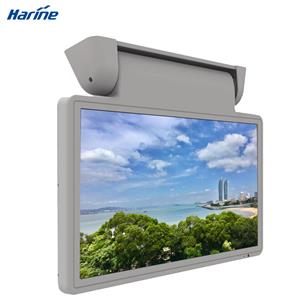
HLMonitor’s 21.5 Inch Auto Flip Roof Mounted LCD Monitor for Coaches is one product option for projects requiring a motorized display. Project-specific installation requirements and validation should be confirmed before integration.
How Should Vibration Performance Be Evaluated?
The phrase “vibration resistant” alone does not explain the conditions under which a monitor has been evaluated.
For a bus or coach project, manufacturers should request relevant test information and confirm whether it applies to the proposed product and mounting arrangement. Useful details include the test method, vibration profile, duration, mounting orientation and acceptance criteria.
Testing an individual monitor does not automatically validate every installation. Brackets, fasteners, supporting structures and cable harnesses can all affect the behavior of the assembled system.
Evaluation in a representative vehicle installation can help identify issues that are difficult to observe during a stationary bench check.
Frequently Asked Questions
Can vibration cause a bus LCD monitor to lose its image?
It can contribute to an intermittent connection if a connector becomes loose or a cable is damaged. However, image loss can also result from power supply problems, video source faults or other electrical issues. Diagnosis should cover the complete signal and power path.
Does a fixed bus monitor also need vibration resistance?
Yes. A fixed monitor has no folding mechanism, but its enclosure, mounting points and connections still experience vehicle movement.
Does an anti-vibration monitor eliminate the need for installation checks?
No. Reliable operation depends on the monitor and its installation working together. Mounting support, fastening, cable routing and maintenance remain important.
What information should a bus manufacturer provide for project evaluation?
Useful information includes the installation location, monitor dimensions and weight, mounting structure, operating position, vehicle application and required validation criteria. These details help the supplier assess the proposed integration more accurately.