Why Does Brightness Adjustment Matter for a Bus LCD Monitor?
Why Does Brightness Adjustment Matter for a Bus LCD Monitor?
A bus LCD monitor operates under changing light conditions throughout the day. Sunlight entering through the windows, interior lighting, shaded roads, and nighttime travel can all affect how passengers see the screen.
A brightness setting that works well during the afternoon may feel excessive after dark. Conversely, a display adjusted for a dim cabin may become difficult to read when daylight enters the vehicle.
For bus manufacturers and fleet operators, brightness adjustment is therefore an important part of onboard display integration. It helps match the screen to the cabin environment and the content passengers need to see.
How Does Cabin Lighting Affect Screen Readability?
The brightness passengers perceive depends on both the display and its surroundings.
During daytime operation, light entering through side windows can create reflections on the screen. These reflections may reduce the visible contrast of text, images, and symbols. A display that appears clear in a workshop may be harder to read once installed in a brightly lit coach.
At night, the situation changes. With less ambient light inside the vehicle, the same display setting can appear much brighter. Large white backgrounds and bright video scenes may become distracting or uncomfortable for nearby passengers.
Evaluating a bus LCD monitor in both conditions provides a more useful assessment than checking it under a single indoor lighting setup.
Why Is Maximum Brightness Not Always the Best Setting?
Higher brightness can help maintain visibility in a bright cabin, but it does not solve every readability problem.
If a window or interior light produces a strong reflection, increasing screen brightness may provide only a limited improvement. Screen position, viewing direction, surface reflections, and content design also need attention.
During nighttime journeys, continuously operating at maximum brightness may create unnecessary light inside the passenger compartment. A lower setting can make the screen more comfortable to view while keeping essential information visible.
The objective is to achieve suitable readability for the operating conditions rather than use the highest available setting throughout every journey.
What Is the Difference Between Manual and Automatic Brightness Adjustment?
Manual brightness adjustment allows an operator or technician to change the display setting through supported controls. Depending on the monitor, these may include an on-screen menu, a remote control, or an integrated control interface.
Automatic brightness adjustment uses an ambient-light sensor and compatible control logic to change backlight output as surrounding light levels vary.
These functions should be confirmed for the specific model. An adjustable brightness setting does not automatically mean that a monitor includes an ambient-light sensor or supports automatic dimming.
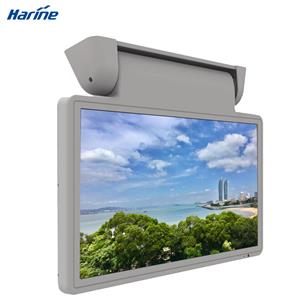
For example, the published specifications for HLMonitor’s 18.5-inch fixed bus LCD monitor list brightness adjustment. Automatic dimming should be discussed separately when defining project requirements. Vehicle Information Display
Why Does Installation Position Matter?
The location of a bus LCD monitor affects the light reaching its surface and the positions from which passengers view it.
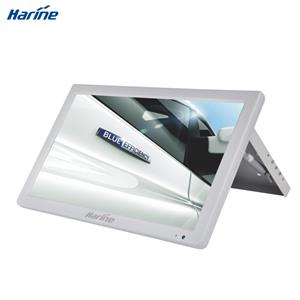
A screen near the front windshield may experience different lighting from one installed farther inside the cabin. A roof-mounted display may also reflect overhead lighting differently from a wall-mounted unit.
The installation should be evaluated from several passenger seats. Readability from directly in front of the screen does not establish how it will appear from the rear rows or seats beside the windows.
Where automatic dimming is used, sensor placement also matters. A sensor covered by trim or exposed to a nearby reading light may detect conditions that do not represent the wider cabin environment.
How Can Content Improve Daytime and Nighttime Viewing?
Brightness adjustment works best when the displayed content is also suitable for passenger viewing.
Passenger information should use readable text, clear spacing, and sufficient contrast between the foreground and background. Small lettering and crowded layouts can remain difficult to read even on a bright screen.
For nighttime operation, a darker interface can reduce the amount of bright imagery visible in the cabin. However, essential information must remain clear, and a dark interface should not replace proper backlight adjustment.
Entertainment content should also be assessed using both bright and dark scenes. A setting that looks comfortable during a dark video sequence may feel excessive when the image changes to a bright scene.
What Should Be Verified Before Fleet Installation?
Brightness performance should be checked with the monitor installed in a representative vehicle.
The evaluation should include daytime and nighttime conditions, interior lights switched on and off, and viewing from different seats. Passenger information screens and entertainment videos should both be tested when the system supports these uses.
For manually adjusted monitors, confirm how staff access the controls and whether the preferred setting remains after power cycling.
For systems with automatic dimming, check how smoothly brightness changes when the vehicle moves between brighter and darker environments. Rapid or repeated adjustments can be distracting, so the control behavior should suit normal vehicle operation.
Documenting the approved settings and test conditions can help maintain a consistent display experience across a fleet.
Bus LCD Monitors for Passenger Information and Entertainment
Brightness adjustment is one part of a complete onboard display solution. Screen position, viewing angle, content design, power supply, and system controls all contribute to the final passenger experience.
HLMonitor offers bus and coach display solutions for commercial vehicle applications. Bus manufacturers and fleet operators can discuss their installation layout and operating requirements to establish the appropriate monitor configuration.
Contact HLMonitor to discuss display size, mounting arrangements, and brightness-control requirements for your bus or coach project.
FAQ
Does every bus LCD monitor support automatic dimming?
No. Manual brightness adjustment and automatic dimming are different functions. Automatic dimming requires suitable sensing and control hardware, so availability should be confirmed for the specific monitor.
Can higher brightness remove screen reflections?
Higher brightness may improve visibility, but it does not remove reflections. Installation position, screen surface characteristics, and surrounding light sources also affect readability.
Should a coach entertainment monitor use the same setting during the day and at night?
A single setting may not suit both conditions. Daytime operation may require greater brightness, while nighttime journeys may benefit from a lower setting that remains clear without producing excessive cabin light.
Is brightness the same as contrast?
No. Brightness describes the light output of the display, while contrast concerns the difference between lighter and darker areas. Both influence readability, especially when ambient light reaches the screen.