What Makes a Reliable Bus Screen for Commercial Vehicles?
What Is a Bus Screen?
A bus screen is an LCD display designed for installation in buses, coaches and other commercial vehicles.
Depending on the vehicle layout, the screen may be installed on the front bulkhead, ceiling, side wall or another visible area inside the cabin. It can operate independently or be integrated with a vehicle media player, camera system, advertising player or onboard control system.
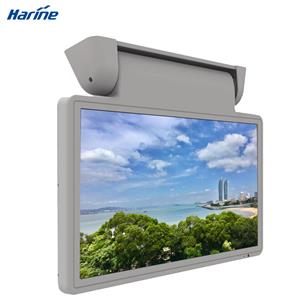
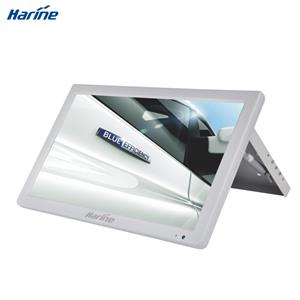
Bus screen products are generally divided into fixed bus LCD screens, manual flip-down screens, motorized flip-down screens, stretched bar LCD screens, vehicle camera monitors and multimedia display screens. Each design serves a different installation position and system requirement.
Unlike a consumer television, a commercial vehicle screen must be developed around the electrical and mechanical conditions of a moving vehicle.
Why Reliability Matters in Commercial Vehicles
A screen failure inside a commercial vehicle may interrupt multimedia playback, advertising, route information or camera monitoring.
For fleet operators, repeated display failures also create additional maintenance costs. A vehicle may need to be removed from service while technicians inspect the monitor, power cable, video source or mounting structure.
A professional vehicle display should remain stable under continuous road vibration, engine vibration, power fluctuations, electromagnetic interference, long operating hours, frequent engine starts and changing cabin temperatures.
Flip-down models must also withstand repeated opening and closing. The entire display system, rather than only the LCD panel, must be designed to handle these operating conditions.
1. Stable 12V and 24V Power Compatibility
Commercial vehicles commonly use 12V or 24V electrical systems. However, the actual voltage inside a vehicle is not always completely stable.
Voltage may rise or fall during engine startup, battery charging or operation of air-conditioning, lighting and other onboard electrical equipment.
A reliable bus screen should support an appropriate wide-voltage input range. Its power circuit should provide overvoltage protection, undervoltage protection, reverse-polarity protection, surge protection, short-circuit protection and electrical interference suppression.
A display that supports both DC 12V and DC 24V systems can be used across a wider range of buses, coaches and special-purpose vehicles. The exact input range should still be checked against the electrical specification of the target vehicle.
2. Anti-Vibration Mechanical Design
Road vibration is one of the main differences between a vehicle display and an ordinary indoor monitor.
The LCD panel, circuit board, housing, video connectors, power cables and mounting brackets are continuously affected by vehicle movement.
An insufficient mechanical structure may eventually cause loose connectors, intermittent power, unstable images, housing noise, damaged mounting points or structural deformation.
A reliable bus LCD screen should use a strong housing and a stable internal structure. Mounting brackets must distribute the screen’s weight correctly, while screws, connectors and cables should remain secure throughout long-term operation.
For manual and motorized flip-down screens, the hinge, locking structure and rotating components require additional attention because they are exposed to both vibration and repeated movement.
3. Anti-Interference Performance
A commercial vehicle contains many electrical and electronic systems, including engine control units, lighting, air-conditioning, cameras, audio equipment, navigation devices, communication systems and media players.
Electrical noise generated by these systems may interfere with the bus screen or its video signal.
Poor electromagnetic compatibility can lead to image flickering, horizontal lines, signal loss, audio noise, unstable video input or touchscreen interference.
A properly designed bus screen should provide effective electromagnetic compatibility and anti-interference performance. Shielded cables, appropriate circuit protection and reliable grounding can further improve system stability after installation.
4. Suitable Screen Size for the Vehicle Interior
Bus screens are available in common sizes such as 15.6 inches, 18.5 inches, 19 inches, 21.5 inches, 24 inches, 27 inches and 32 inches.
Smaller displays may be appropriate for compact buses, shuttle vehicles or front-cabin installations. Larger screens can provide better visibility in long-distance coaches and larger commercial vehicles.
However, increasing the screen size does not automatically produce a better result.
The selected screen must fit the interior structure without obstructing the driver’s view, passenger movement, emergency exits or overhead clearance. Engineers should confirm the display dimensions, weight, viewing distance and mounting position before finalizing the model.
5. Clear Resolution and Image Quality
Resolution affects the clarity of text, graphics, video content and camera images.
Common bus screen resolutions include 1024 × 600, 1280 × 800, 1366 × 768 and 1920 × 1080.
Standard HD resolution may be sufficient for basic multimedia playback and advertising. Larger screens, detailed interfaces and camera monitoring systems may benefit from Full HD resolution.
The media player, DVR, camera controller or other signal source must support the native resolution of the screen. An incompatible signal may result in image stretching, black borders, reduced clarity or unstable video output.
6. Wide Viewing Angle
Passengers and operators may view the screen from different seats and positions inside the vehicle.
A screen with a narrow viewing angle may appear darker, discolored or unclear when viewed from the side.
IPS LCD technology is often used in commercial vehicle screens because it provides a wider viewing angle and more stable color performance.
This is particularly useful when the screen is mounted above eye level, installed near the front of a long cabin or viewed by passengers sitting on both sides of the aisle.
7. Appropriate Screen Brightness
Lighting conditions inside a bus or coach can change significantly throughout the day.
Sunlight entering through the windows may reduce image visibility, while excessive brightness at night may cause discomfort.
A reliable bus screen should provide enough brightness for daytime operation while supporting suitable adjustment for darker conditions.
Brightness must be balanced against power consumption, internal heat, nighttime comfort and LED backlight lifetime. Some commercial vehicle projects may require manual brightness control or automatic dimming according to ambient light.
8. Reliable LED Backlight
Commercial vehicles may operate for many hours each day, making backlight quality an important factor in long-term reliability.
LED backlight performance is influenced by operating temperature, driving current, thermal design, daily operating time and maximum brightness settings.
A high-quality backlight should provide uniform illumination across the panel without obvious bright spots, dark areas or uneven edges.
Effective heat dissipation and controlled backlight driving can help maintain stable brightness and extend the useful life of the screen.
9. Fixed, Manual Flip or Motorized Design
Fixed Bus Screen
A fixed bus screen remains permanently visible after installation.
It is commonly mounted on the front bulkhead, ceiling or side wall. Its relatively simple structure makes it suitable for frequent multimedia playback, advertising, vehicle information and camera monitoring.
Manual Flip-Down Screen
A manual flip-down bus screen can be opened when required and folded toward the ceiling when it is not in use.
This design saves space and helps maintain a cleaner vehicle interior. Because it does not require an electric motor, the operating structure is relatively straightforward.
Motorized Flip-Down Screen
A motorized bus screen opens and closes electronically.
It provides a more automated cabin design and is commonly considered for coaches, tour buses and premium commercial vehicles.
The motor, hinge, control circuit and locking mechanism must remain reliable under repeated operation and continuous road vibration.
10. Compatible Video and Audio Interfaces
A bus screen may need to connect with vehicle media players, Android players, advertising systems, DVR equipment, reversing cameras, 360 surround-view systems, navigation systems or onboard computers.
Depending on the project, the required interfaces may include HDMI, VGA, AV, CVBS, USB and audio input or output.
The signal source and the display must support compatible resolutions, video formats and connector definitions.
Cable length also matters. In long buses and coaches, poor-quality or excessively long signal cables may reduce image stability. Cable routing and signal protection should therefore be considered during system design.
11. Integration with Vehicle Media Players
A bus screen normally requires a media player or another video source to deliver content.
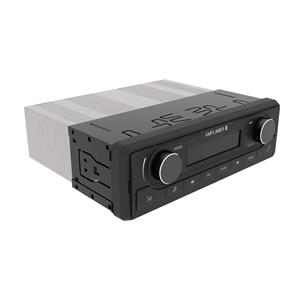
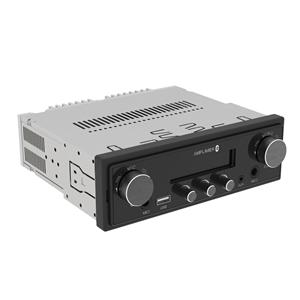
Vehicle media players may support USB playback, SD card playback, Bluetooth, Android applications, network content updates, multiple video outputs, remote control and scheduled playback.
Using a compatible screen and vehicle media player can simplify installation and reduce problems related to signal format, resolution, power supply and audio output.
For fleet and OEM projects, coordinated system development is often more reliable than combining unrelated consumer-grade components.
12. Integration with Camera Systems
Some commercial vehicle screens are used primarily for safety monitoring rather than entertainment.
The display may receive images from reversing cameras, side-view cameras, front cameras, interior surveillance cameras, blind-spot cameras or a complete 360 surround-view system.
Camera applications require stable signal input and fast image response. The display should present the video without excessive delay, distortion, flickering or interruption.
Reliability is especially important in reversing and blind-spot applications because the driver may depend on the screen while maneuvering the vehicle.
13. Heat Dissipation and Long Operating Hours
A bus screen may operate continuously throughout an entire journey or work shift.
The LED backlight, power circuit and processing components generate heat during operation. If this heat remains trapped inside the housing, the internal temperature may rise and affect display stability or component lifetime.
A reliable screen should include an appropriate thermal structure, ventilation design or heat-dissipation materials.
Installation engineers should also avoid blocking ventilation openings or positioning the screen too close to other heat-producing equipment.
14. Secure Installation Structure
The mounting system must keep the screen stable during acceleration, braking, cornering and operation on uneven roads.
Before installation, technicians should confirm the mounting position, bracket strength, screen weight, cable routing, passenger clearance, driver visibility, ventilation space and future maintenance access.
For ceiling-mounted screens, the supporting structure must safely carry the weight of the display during long-term vehicle operation.
An appropriate installation structure protects both the screen and the vehicle interior.
15. Easy Maintenance and Serviceability
Fleet operators require display equipment that can be inspected and maintained efficiently.
The installation should allow technicians to access power cables, signal connectors, mounting screws and control components without removing large sections of the vehicle interior.
Standardized connectors and modular components can simplify repair and replacement work.
For long-term fleet projects, technical documents, wiring information, spare-part availability and after-sales support are also important parts of product reliability.
16. OEM and Customization Capabilities
Commercial vehicle projects often require more than a standard off-the-shelf screen.
Different vehicle manufacturers may use different cabin structures, electrical systems, mounting positions and system interfaces.
Customization may involve the screen size, housing design, mounting bracket, surface color, logo printing, input interfaces, cable length, connector type, power specification, flip-down structure, motorized mechanism or media player integration.
OEM and ODM support allows the bus screen to match the vehicle design more closely. Customized brackets and cables can also simplify installation during vehicle production.
Applications of Bus Screens
City Buses
City buses may use screens for advertising, vehicle information, system messages and camera images. These displays must support frequent daily operation and stable performance under repeated engine starts.
Long-Distance Coaches
Long-distance coaches commonly use larger fixed or flip-down screens for multimedia playback, announcements and onboard communication. Viewing angle, image quality and audio integration are especially important.
School Buses
School buses may use screens for safety content, camera monitoring and vehicle information. Secure mounting and simple operation are important because the equipment is used around children.
Shuttle Vehicles
Airport shuttles, hotel buses and employee transport vehicles may use screens for advertising, branding, welcome messages and multimedia content.
Tour Buses
Tour buses may display destination videos, maps, local introductions and promotional material. Manual or motorized flip-down screens can support a flexible and organized cabin layout.
Construction and Special-Purpose Vehicles
Commercial vehicle screens can also be installed in construction machinery, emergency vehicles, agricultural equipment and other specialized fleet systems. These applications may require stronger vibration resistance and wider operating temperatures.
Common Problems with Low-Quality Bus Screens
A low-quality display may operate normally during initial testing but develop problems after long-term use inside a vehicle.
Typical failures include screen flickering, automatic restarting, loose connectors, interrupted video signals, dim backlights, uneven brightness, broken flip mechanisms, housing vibration noise, overheating and slow startup.
Many of these problems are associated with inadequate power protection, weak mechanical construction, insufficient thermal design or low-quality components.
Using a display developed specifically for commercial vehicles can help reduce long-term maintenance and replacement costs.
Reliable Bus Screen Solutions from HLMonitor
HLMonitor provides fixed bus LCD screens, manual flip-down screens, motorized flip-down screens, vehicle media players, camera monitors, 360 surround-view systems and center control displays.
Different screen sizes, mounting structures, interfaces and power configurations can be supplied according to project requirements.
Bus manufacturers, distributors and system integrators can provide their required screen size, mounting method, input interface, operating voltage and application details for product evaluation and customization.