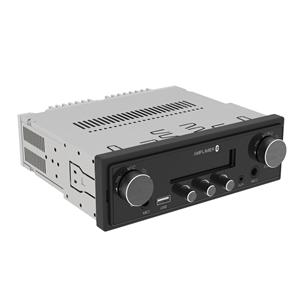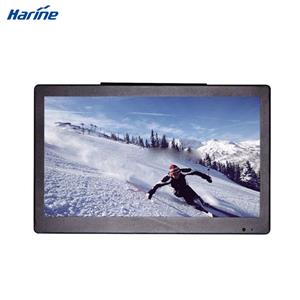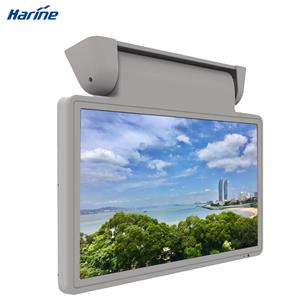
What Is an LCD Screen in a Bus?
When passengers enter a modern city bus, coach, school bus, or airport shuttle, they may notice one or more digital screens installed above the seats, near the driver, on the dashboard, or at the front of the vehicle. These screens are generally known as bus LCD screens.
A bus LCD screen is a digital display designed specifically for use inside or around a bus. It can show route information, station announcements, safety messages, advertisements, entertainment content, surveillance images, or vehicle operating data.
Unlike an ordinary household television, an LCD screen used in a bus must operate reliably in a moving environment. It may need to withstand vibration, temperature changes, voltage fluctuations, dust, long operating hours, and frequent vehicle movement.
What Does a Bus LCD Screen Display?
The information shown on a bus LCD screen depends on the type of vehicle and the purpose of the display system.
In public transportation, the screen may show the current route, next stop, destination, transfer information, estimated arrival time, service announcements, and emergency instructions. This helps passengers understand where the bus is going and when they should prepare to get off.
In long-distance coaches and tour buses, LCD screens are often used for movies, music, tourism videos, passenger entertainment, or onboard advertising.
School buses may use LCD monitors to display safety instructions, camera images, student information, or vehicle status. In commercial buses and shuttle vehicles, screens may also be connected to surveillance cameras, reversing cameras, media players, or fleet management systems.
Because one screen can support several functions, a bus LCD display system is often more than a simple video monitor. It can become part of the vehicle’s passenger information, entertainment, security, and operating system.
Where Are LCD Screens Installed in a Bus?
Bus LCD screens can be installed in different positions according to their intended use.
A front-mounted screen is usually installed near the front ceiling or behind the driver. It provides a clear view for most passengers and is commonly used for route information, advertising, or entertainment.
Roof-mounted or manual-flip monitors are often used in coaches and tour buses. The screen can be folded away when it is not needed, helping save space and protect the display.
Seat-back screens provide individual entertainment or information for passengers. They are commonly found in luxury coaches, tourist buses, and premium passenger vehicles.
Dashboard and center-control displays are mainly designed for drivers. These screens may show navigation, vehicle status, camera feeds, multimedia controls, or driver assistance information.
External or window-facing LCD screens can display route numbers, destinations, advertisements, or public information to people outside the vehicle.
The installation location affects the required screen size, brightness, mounting structure, viewing angle, and signal interface.
How Does a Bus LCD Screen Work?
Most bus LCD screens use liquid crystal display technology. The display panel controls the amount of light passing through individual pixels, while an LED backlight provides illumination behind the panel.
The screen receives video or data signals from another device, such as a media player, onboard computer, Android system, camera system, GPS unit, or passenger information controller.
A typical bus display system may include:
An LCD panel
A control board
A power supply module
A metal or plastic enclosure
Audio output
Video input interfaces
A mounting bracket
A media player or operating system
Some bus monitors are simple display terminals, while others have built-in Android systems, USB playback, network connectivity, storage, speakers, or remote content management functions.
For example, an Android bus LCD screen can receive updated advertising or route content through Wi-Fi, 4G, or another communication network. This allows operators to manage multiple screens without manually replacing media files on every vehicle.
What Is the Difference Between a Bus LCD Screen and a Regular Monitor?
Although a bus LCD screen may look similar to a regular monitor, the internal design and operating requirements can be very different.
A home monitor normally operates in a stable indoor environment. A bus monitor is continuously exposed to vibration, road shocks, changing temperatures, unstable vehicle power, and long operating periods.
For this reason, a reliable bus LCD screen usually requires a stronger enclosure, stable mounting points, protected internal components, and a vehicle-compatible power design.
Many buses use 12V or 24V electrical systems, but the actual voltage may fluctuate while the engine starts or other electrical equipment operates. The display therefore needs a power circuit that can handle voltage changes and reduce the risk of sudden shutdown, flickering, or component damage.
Bus LCD screens may also require higher brightness than ordinary indoor displays. Sunlight entering through bus windows can make low-brightness screens difficult to read. A brighter panel and anti-glare surface can improve visibility during daytime operation.
Wide viewing angles are also important because passengers view the screen from different seats and positions.
Common Sizes of Bus LCD Screens
Bus LCD screens are available in a wide range of sizes. The right size depends on the vehicle layout, viewing distance, installation position, and application.
Smaller displays, such as 7-inch, 9-inch, 10.1-inch, or 12.3-inch screens, are commonly used for dashboards, camera systems, driver controls, and compact passenger information terminals.
Medium-sized screens, including 15.6-inch, 18.5-inch, 19-inch, 21.5-inch, and 24-inch models, are suitable for front-mounted passenger information, advertising, and multimedia systems.
Larger screens, such as 27-inch, 32-inch, and 40-inch displays, may be used in large coaches, airport buses, tour buses, mobile exhibition vehicles, and other commercial passenger vehicles.
A larger screen is not always the best choice. The display should fit the available installation space without blocking mirrors, emergency exits, passenger movement, or the driver’s field of view.
What Features Should a Bus LCD Screen Have?
A suitable bus LCD screen should provide more than a clear image. Its mechanical, electrical, and functional design should match the vehicle environment.
Stable Vehicle Power Input
The screen should support the bus power system and tolerate reasonable voltage fluctuations. Protection against overvoltage, reverse polarity, short circuits, and electrical interference may also be important.
High Brightness
A brighter screen improves visibility in buses with large windows or strong sunlight. The required brightness depends on whether the screen faces passengers, windows, or outdoor areas.
Wide Viewing Angle
Passengers may view the display from the side, below, or from a distant seat. IPS or other wide-viewing-angle LCD technology can help maintain image clarity and color consistency.
Vibration-Resistant Construction
The housing, circuit boards, connectors, and mounting system should remain stable while the vehicle is moving. Loose connections can cause signal interruptions or display failure.
Multiple Signal Interfaces
Common interfaces may include HDMI, VGA, AV, USB, CVBS, LVDS, Ethernet, or camera inputs. The required interface depends on the onboard media player, computer, camera, or control system.
Flexible Installation
Bus screens may require wall mounting, ceiling mounting, manual-flip brackets, dashboard installation, or embedded mounting. The mechanical structure should match the vehicle design.
Long Operating Life
Public buses and commercial coaches may operate for many hours every day. A durable backlight, stable heat dissipation, and reliable electronic components can reduce maintenance requirements.
Remote Content Management
For advertising and passenger information systems, remote content updating can significantly improve operating efficiency. Operators can update routes, advertisements, announcements, and promotional videos across multiple vehicles.
What Are the Main Applications of Bus LCD Screens?
Passenger Information
A bus LCD screen can display the current stop, next station, route map, destination, transfer information, and estimated arrival time. Visual information is especially useful in noisy environments where audio announcements may be difficult to hear.
Onboard Advertising
Bus screens can play commercial advertisements, public service announcements, local business promotions, and city information. Digital content can be updated more easily than printed advertising materials.
Passenger Entertainment
Long-distance coaches and tour buses often use LCD monitors for movies, music videos, tourism introductions, and other entertainment content.
Camera Monitoring
The display can connect to reversing cameras, interior surveillance cameras, door cameras, or blind-spot cameras. This helps the driver observe areas that are difficult to see directly.
Driver Information
Dashboard and center-control screens can display navigation, speed information, vehicle status, multimedia controls, parking assistance, and camera images.
Safety Communication
During emergencies or special operating conditions, the screen can show evacuation instructions, warning messages, safety reminders, or service changes.
Why Are LCD Screens Important in Modern Buses?
Modern passengers expect transportation systems to provide clear, timely, and accessible information. A bus LCD screen helps operators communicate with passengers more effectively than printed signs alone.
Digital screens can display changing content in real time. When a route changes, a stop is temporarily closed, or a service delay occurs, the system can update the information without replacing physical materials.
Bus monitors can also improve accessibility. Visual station announcements help passengers who may not hear audio messages clearly. Multilingual content can support tourists and international passengers.
For operators, LCD screens create additional opportunities for advertising, service promotion, fleet communication, and centralized content management.
When integrated with cameras and driver assistance systems, they can also contribute to safer vehicle operation.
How to Choose the Right LCD Screen for a Bus
The selection process should begin with the intended application.
A passenger information screen has different requirements from a reversing monitor. An advertising display may require Android software and network connectivity, while a driver camera monitor may prioritize low signal delay and multiple video inputs.
Buyers should consider the installation space, viewing distance, required brightness, resolution, input signals, operating voltage, mounting method, operating temperature, and content management system.
It is also important to confirm whether the screen will be installed inside the vehicle, near a window, on the dashboard, or in an external-facing position.
For customized bus projects, the display supplier may need to adjust the housing, mounting bracket, interface, cable length, software, logo, color, and functional configuration.
Testing the complete system before large-scale installation can help identify compatibility issues between the screen, media player, camera, vehicle power supply, and mounting structure.
Are Bus LCD Screens Customizable?
Yes. Bus LCD screens can be customized according to the vehicle design and project requirements.
Common customization options include screen size, brightness, resolution, housing structure, color, mounting bracket, power input, signal interface, touch function, Android operating system, speakers, buttons, cables, and branding.
Some projects require unusual screen shapes, such as stretched bar LCD displays. These screens are suitable for route information, destination displays, digital signage, or narrow installation spaces.
A customized solution is particularly useful for bus manufacturers, fleet operators, public transportation projects, and vehicle system integrators that need the display to fit an existing vehicle structure.
FAQ
Is a bus LCD screen the same as a bus TV?
Not always. A bus TV is mainly designed for video and entertainment, while a bus LCD screen may also display route information, advertisements, camera images, vehicle data, or safety messages.
Can a bus LCD screen connect to a reversing camera?
Yes. Many vehicle monitors support AV, CVBS, AHD, or other camera signal inputs. The exact compatibility depends on the display and camera system.
What voltage does a bus LCD screen use?
Many bus displays are designed for 12V or 24V vehicle systems. The exact input range should be confirmed before installation.
Can content be updated remotely?
Some Android and network-enabled bus displays support remote content management through Wi-Fi, 4G, Ethernet, or a cloud-based platform.
What screen size is suitable for a bus?
The suitable size depends on the bus interior, viewing distance, installation position, and display purpose. Passenger-facing screens are often larger than dashboard or camera monitors.
Can a bus LCD screen play advertisements?
Yes. Bus LCD screens are widely used for onboard digital advertising, promotional videos, public information, and commercial announcements.
Does a bus LCD screen need high brightness?
Higher brightness is recommended when the screen is exposed to strong ambient light or sunlight. Interior screens installed away from windows may require less brightness.