How Does a Motorized Bus Monitor Integrate with a Coach Entertainment System?
How Does a Motorized Bus Monitor Integrate with a Coach Entertainment System?
A motorized bus monitor integrates with a coach entertainment system through three main connections: vehicle power, a compatible video signal from the media player, and a control arrangement for opening and closing the screen. The audio path must also be coordinated with the coach amplifier and speakers.
For bus manufacturers and system integrators, successful integration involves more than installing a roof-mounted display. The monitor, media source, control equipment, wiring and mounting structure need to work together throughout everyday vehicle operation.
The Monitor’s Role in the Entertainment System
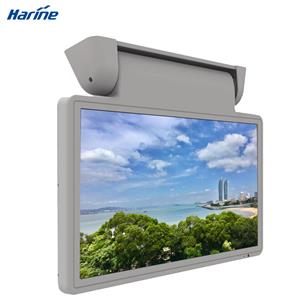
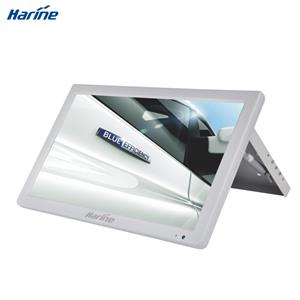
A motorized bus monitor provides a shared viewing screen for passengers. Its folding mechanism allows the display to move into a viewing position when required and return to its stored position after use.
The monitor should be treated as the display component of the system. Unless the selected model includes built-in playback functions, a separate media player supplies the content. Audio may follow a separate route through the vehicle’s sound system.
This distinction matters when specifying equipment. A monitor’s automatic folding function does not, by itself, mean that it can play media files, control an amplifier or communicate with the vehicle’s central controller.
For a complete project, review the display alongside the other components in the bus and coach solution.
Matching the Video Source to the Display
The first integration task is confirming compatibility between the media player’s output and the monitor’s input.
Check the exact interface, supported signal format and output settings for the proposed equipment. A matching connector alone is not enough to confirm compatibility, and optional inputs should be specified before ordering.
For example, HLMonitor’s 21.5-inch motorized bus monitor lists RCA or optional VGA input. Buyers should confirm the supplied configuration against their intended media source.
The display resolution and accepted input signal also need separate attention. A Full HD panel does not automatically mean that every video input accepts every Full HD signal format.
Where an existing coach entertainment system is being upgraded, identify the installed player and its available outputs first. This helps determine whether the replacement monitor can connect directly or whether additional equipment is required.
Coordinating Screen Movement and Playback
Screen movement and media playback are separate functions that need a clear operating sequence.
Before installation, agree on how the driver or attendant will open the monitor, select content and close the display. Confirm whether the selected monitor uses its own controls or supports integration with another control device.
Do not assume that connecting video will automatically open the screen. Likewise, switching off the player may not cause the monitor to fold away.
A practical commissioning procedure should check:
How the screen opens before passenger viewing.
How playback starts and stops.
How the screen closes after use.
What happens when vehicle power is interrupted and restored.
Any requirements for ignition-linked operation, central control or automatic closing should be confirmed with the supplier for the exact model.
Planning Vehicle Power and Wiring
Power planning should cover both the LCD display and the motorized mechanism.
Confirm the monitor’s specified input-voltage range against the vehicle supply. Also check the supplier’s requirements for wiring, circuit protection, grounding and connections. The electrical design should account for the complete entertainment system rather than the display alone.
Cable routing deserves attention around the folding mechanism. Wiring must remain clear of moving parts and should not be stretched, pinched or repeatedly bent as the screen opens and closes.
For fleet installations, document the connector pinout, cable arrangement and power connection method. Consistent wiring makes installation and later replacement easier to manage.
Connecting Audio to the Coach Sound System
Passenger audio needs its own integration plan.
Depending on the equipment, audio may travel from the media player to an amplifier and then to the cabin speakers. Confirm the player’s audio outputs, the amplifier’s inputs and the intended volume-control arrangement.
If the coach also uses a driver microphone or tour-guide microphone, define how announcements interact with entertainment audio. Any priority, muting or mixing function must be supported by the selected audio equipment.
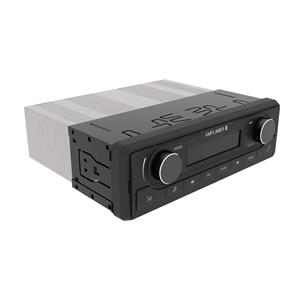
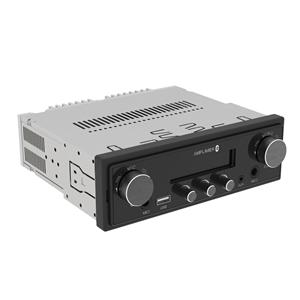
HLMonitor’s vehicle player and amplifier range provides related equipment to review when planning the audio side of the installation. Check individual specifications, since an audio player or amplifier may not provide the video output needed by the monitor.
During commissioning, test picture and sound together. Check for noticeable synchronization problems, background noise and suitable listening levels throughout the passenger cabin.
Fitting the Monitor into the Coach Interior
Mechanical integration should begin before the ceiling design is finalized.
Check the monitor’s mounting dimensions and its full movement envelope. Both the stored position and the deployed position need sufficient clearance from luggage racks, lighting, ventilation outlets and other interior fittings.
The mounting structure should be assessed against the monitor supplier’s installation requirements and the vehicle manufacturer’s structural requirements. Interior trim alone should not be assumed to provide adequate support.
Passenger visibility also matters. Review the viewing position from the front, middle and rear seats, including whether another monitor is needed for the cabin layout.
Finally, leave suitable access for servicing connectors and replacing the display. A tidy installation should still allow maintenance without unnecessary removal of surrounding interior components.
Using More Than One Monitor
For coaches with multiple passenger displays, confirm how the video source will feed each monitor.
The distribution arrangement must suit the signal format and the required cable lengths. Avoid assuming that a simple cable splitter will provide reliable results for every interface.
Screen control requires a separate decision: should all monitors open together, or should each display operate independently? Confirm the required behavior and the supported control method before ordering.
Testing should include every monitor running at the same time. Check picture stability, screen movement and audio synchronization under the intended operating conditions.
Verifying the Complete Installation
A sample installation can reveal compatibility and layout issues before equipment is rolled out across a fleet.
Test the actual monitor with the intended media player, amplifier, controller and wiring. Verify startup, playback, folding operation and the agreed response to power changes.
Also inspect cable clearance during repeated opening and closing. Check viewing conditions from passenger seats and confirm that service personnel can reach the relevant connections.
For procurement, provide the supplier with the vehicle supply voltage, media-player output, required screen-control method, installation drawings and number of monitors. These details help establish a clear configuration for the project.
FAQ
Does a motorized bus monitor need a separate media player?
If the selected monitor does not include built-in media playback, it needs an external source to supply video. Confirm playback functions in the exact model specification.
Can a motorized bus monitor connect to an existing coach entertainment system?
It may be possible if the video signal, power supply, controls and mounting arrangement are compatible. Identify the existing equipment before specifying a replacement.
Does the monitor open automatically when video starts?
This should not be assumed. Automatic opening depends on the supported control method and the installed system configuration.
Can one media player supply several bus monitors?
Yes, provided the source and a suitable distribution arrangement support the selected signal format and installation. Confirm the design for the required number of screens and cable lengths.
What information should buyers send before requesting a quotation?
Provide the required screen size, vehicle voltage, video-source details, opening and closing control requirements, mounting space and order quantity. Installation drawings can also help the supplier assess the project.
Discuss Your Coach Entertainment Project
A motorized bus monitor works best when its display, folding mechanism and connections are specified as part of the complete coach entertainment system.
Explore HLMonitor’s motorized bus monitor and share your vehicle layout, media-source details and control requirements to discuss a suitable configuration.