Fixed vs. Flip-Down Bus LCD Monitor: Differences for Coach Projects
Fixed vs. Flip-Down Bus LCD Monitor: Differences for Coach Projects
A bus LCD monitor can provide entertainment, passenger information and service announcements throughout a journey. Before selecting a screen size, however, bus manufacturers and fleet operators need to determine how the monitor will fit into the vehicle interior.
Fixed and flip-down monitors offer different installation and operating arrangements. A fixed monitor remains in its installed position, while a flip-down monitor can fold away when it is not required. Flip-down designs may use manual operation or a motorized mechanism.
The appropriate arrangement depends on the display’s purpose, available cabin space and the way staff will operate the system.
What Is a Fixed Bus LCD Monitor?
A fixed bus LCD monitor stays in a set mounting position during normal use. Depending on the product and vehicle layout, it may be installed near the front of the cabin, beneath the ceiling or against an interior partition.
This arrangement suits projects where the screen needs to remain visible whenever information is displayed. Examples include route information, service messages and onboard multimedia content.
Because the monitor does not fold away, its position must be assessed carefully during interior design. The screen and bracket should fit the available space without interfering with passenger movement, access to nearby equipment or required sightlines.
Harine’s 18.5-inch fixed bus LCD monitor provides a product reference for projects considering a permanently positioned onboard screen.
What Is a Flip-Down Bus Monitor?
A flip-down bus monitor opens into a viewing position and folds back toward its mounting base when it is not needed. This arrangement is useful when the vehicle interior needs to accommodate both screen use and periods with the display stowed.
The installation requires space for the complete movement of the screen. Checking only the closed dimensions is insufficient: the open position, movement path and access for servicing also matter.
Flip-down monitors are commonly considered for coach entertainment projects where screens are deployed for selected parts of the journey.
Manual Flip-Down Operation
A manual flip-down monitor requires staff to move the screen between its viewing and stowed positions. Buyers should confirm how the screen is held securely in each position and whether staff can reach it comfortably.
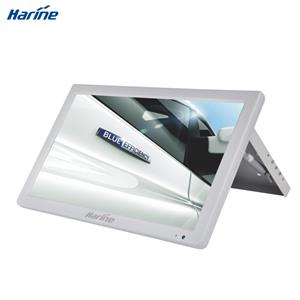
This arrangement may suit projects where screens are adjusted infrequently and manual access is practical. Harine offers a 21.5-inch manual flip bus LCD monitor for coach entertainment applications.
Motorized Flip-Down Operation
A motorized bus monitor uses a powered mechanism to open and close the screen. The control method and operating sequence should be confirmed for the selected model.
For a coach with multiple screens, the project team should establish whether the monitors need individual or coordinated operation. The supplier should also confirm the behavior during power interruption and the procedure if a screen cannot move normally.
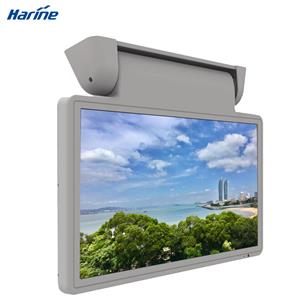
Harine’s 21.5-inch motorized bus monitor is an example of an automatic roof-mounted display for buses and coaches.
Fixed and Flip-Down Bus LCD Monitor Comparison
| Project consideration | Fixed monitor | Manual flip-down monitor | Motorized flip-down monitor |
|---|---|---|---|
| Screen position | Remains in its installed position | Manually opened and stowed | Opened and stowed by a powered mechanism |
| Space assessment | Installed screen and bracket | Closed position, open position and movement path | Closed position, open position and movement path |
| Staff operation | No deployment step | Physical access required | Compatible controls required |
| Integration focus | Power, video and mounting | Power, video, mounting and manual access | Power, video, mounting and movement controls |
| Service planning | Access to screen, cables and bracket | Also consider hinges and retaining parts | Also consider motor, mechanism and controls |
The table compares general design arrangements. Final requirements depend on the selected product and the vehicle installation.
Start with the Passenger Viewing Position
The mounting mechanism does not determine whether passengers can read the screen comfortably. Screen size, installation height, viewing angle and cabin layout all affect the result.
A monitor mounted near the front of a coach may be visible to the first rows but difficult to read from the rear. Overhead compartments or seat structures may also obstruct the view.
Assess the proposed display position from several seats before confirming the installation. Use realistic content, including subtitles, service messages and any information passengers must read quickly.
For longer cabins, evaluate whether one screen provides adequate coverage or whether additional displays are needed.
Check the Complete Installation Space
For a fixed monitor, review the space occupied by the display housing, bracket and cables. Confirm that the mounting structure can support the installation under the vehicle’s operating conditions.
For a flip-down monitor, extend this review to the screen’s full movement path. Nearby ceiling panels, lighting, air outlets and luggage compartments should be considered before the mounting position is approved.
The design review should also cover servicing. Technicians need practical access to connectors, fasteners and any moving components without unnecessary removal of surrounding interior parts.
Confirm Power, Video and Control Compatibility
A bus LCD monitor must work with the vehicle’s electrical supply and onboard media system. A similar screen size or housing does not establish compatibility with an existing installation.
Confirm the selected monitor’s input voltage range, power consumption, video connections and supported signal formats. Review the cable arrangement between the player and each screen, particularly when several monitors share the same source.
For motorized models, document how opening and closing are controlled. Clarify whether screen movement and video playback operate independently or follow a coordinated sequence.
These details should be agreed before samples are installed in the vehicle.
What to Include in a Bus Monitor Inquiry
A useful inquiry gives the supplier enough information to assess both the display and its installation.
| Information to provide | Purpose |
|---|---|
| Vehicle type and cabin layout | Establishes the installation context |
| Entertainment or passenger information use | Defines the main display task |
| Preferred screen size and quantity | Supports product and system planning |
| Fixed, manual or motorized preference | Identifies the required mounting arrangement |
| Available space and installation drawings | Helps assess fit and clearance |
| Vehicle supply and media player connections | Supports electrical and signal compatibility checks |
| Sample quantity and project schedule | Helps plan evaluation and delivery |
Photos or drawings of the intended installation area can make the discussion more precise, especially for replacement projects.
Bus and Coach Display Solutions from Harine
Harine offers fixed, manual flip and motorized bus LCD monitors for different vehicle layouts and onboard display requirements.
Explore the bus and coach solutions to review available products. For a specific project, contact Harine with your installation drawings, screen requirements and media system details to discuss suitable options.
FAQ
What is the main difference between a fixed and a flip-down bus LCD monitor?
A fixed monitor remains in its installed position. A flip-down monitor can move between a viewing position and a stowed position, using either manual operation or a powered mechanism.
Is a motorized bus monitor suitable for passenger information?
It may be, depending on the operating arrangement. If information must remain visible throughout service, confirm that the screen will stay deployed whenever needed and that its position suits the cabin layout.
Can a fixed monitor be replaced with a flip-down model?
A replacement requires a new installation assessment. Check the mounting structure, movement clearance, wiring, power requirements and controls before confirming compatibility.
Do several bus monitors need separate media players?
Not necessarily. Multiple monitors may share a video source when the player, signal distribution equipment and monitors are compatible. Confirm the arrangement for the required number of screens.
What should be tested before a fleet order?
Install a sample using the intended bracket, cables, power supply and media player. Check passenger visibility, image stability, control operation and service access. For flip-down models, also evaluate opening, closing and secure positioning.