Bus Passenger Information Display: Making Onboard Information Clearer
Passengers need to know where they are going, what will happen next and whether a service has changed. In a bus or coach, that information may be delivered through announcements, printed notices or an onboard screen. A bus passenger information display gives operators a visible channel for route details, service messages and other content throughout the journey.
For vehicle manufacturers and fleet operators, the display is only one part of the project. Its position, power supply and connection to the content source all affect how useful it will be in daily operation.
What Can an Onboard Display Show?
The content depends on the vehicle and the system connected to the monitor. A city bus may use screens for route information and stop announcements. An intercity coach may show journey notices, safety messages or entertainment. A shuttle operator may need a simple way to communicate pickup instructions or service changes.
These uses should be defined early. A monitor that receives video from a separate player has different system requirements from a fully integrated passenger information system. Before selecting the screen, buyers should confirm where the content comes from, which video output the source provides and how updates will be managed across the fleet.
Visibility Starts With Placement
A display needs to be readable from passenger seating areas without obstructing movement or creating a distraction for the driver. The best screen position varies with the cabin layout, seat arrangement and intended content.
A fixed monitor can work well where information needs to remain visible throughout the trip. Ceiling or wall installation may be considered depending on the available space. Screen size also matters, but a larger screen alone will not solve poor placement or text that is too small to read at a distance.
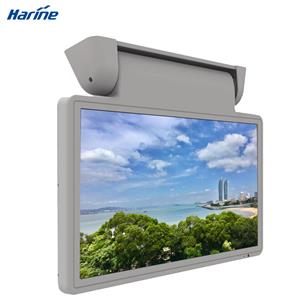
For example, Harine’s 18.5 inch fixed bus LCD monitor is presented for passenger information and supports several mounting arrangements. The appropriate installation still needs to be checked against the vehicle design.
Vehicle Conditions Matter
A bus display operates in a different environment from an indoor commercial screen. It must work with the vehicle’s electrical system and remain secure during vibration and regular use. Buyers should review the required input voltage, mounting structure and operating conditions for the specific model.
It is also useful to consider maintenance access. Installers may need to reach the screen’s connections, and fleet teams may need to replace a unit without extensive changes to the cabin. These practical details become more significant when the same display is installed across many vehicles.
Match the Monitor to the Content System
A passenger information project may involve a media player, an announcement system or another onboard controller. The monitor and source device need compatible connections and an agreed plan for how content will appear.
When discussing a project with a supplier, clarify:
What information will be displayed?
Where will the video signal come from?
Which input interface is required?
Will the screen turn on automatically with the vehicle?
How many displays will be installed in each vehicle?
Answering these questions helps prevent a mismatch between the screen, the installation plan and the operator’s actual workflow.
A Practical Approach for Fleet Projects
For a single vehicle, a display can be selected around an existing source and mounting position. For a fleet, consistency becomes just as important. Operators benefit from a repeatable installation, predictable screen behavior and a clear process for managing content.
Harine supplies bus and coach display solutions for different onboard applications. If you are planning a passenger information display project, share your vehicle type, installation location, content source and expected quantity so the screen options can be evaluated against your requirements.
FAQ
What is a bus passenger information display?
It is an onboard screen used to show information such as route details, service notices, safety messages or other passenger-facing content. The available functions depend on the connected content system.
Can one display be used for both passenger information and entertainment?
Potentially, yes. The content source must support the intended use, and the screen must have a compatible input. Operators should also decide which information takes priority when both are needed.
Is a fixed or flip-down monitor better for passenger information?
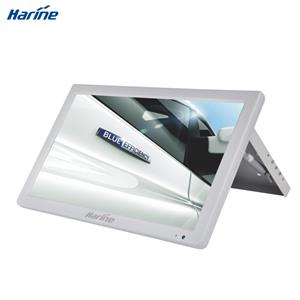
A fixed monitor suits information that should remain visible during a journey. A flip-down monitor may suit a cabin where the screen is used only at certain times. The choice depends on the vehicle layout and operating plan.
What should I provide when requesting a bus display quotation?
Provide the vehicle type, preferred screen position, approximate screen size, power requirements, video source and connection type, along with the planned order quantity. Photos or drawings of the installation area can help the supplier assess mounting options.