Bus Passenger Information Display for Modern Public Transport
Bus Passenger Information Display for Modern Public Transport
A bus passenger information display provides passengers with clear and timely information during a journey. Depending on the transport system, the screen may show route numbers, upcoming stops, transfer information, service announcements, safety instructions, advertising, or entertainment content.
Unlike an ordinary indoor screen, a passenger information display for buses must operate inside a moving vehicle. It may face continuous vibration, voltage changes, limited installation space, changing light conditions, and long daily operating hours.
For bus manufacturers, system integrators, and fleet operators, selecting the correct display is therefore an important part of building a reliable passenger information system.
What Is a Bus Passenger Information Display?
A bus passenger information display is an onboard screen used to communicate visual information to passengers. It can work as part of a complete passenger information system or as an independent display connected to a vehicle media player, control unit, or other content source.
The displayed content may include:
Current route and destination
Next-stop information
Estimated arrival information
Transfer guidance
Service changes
Safety messages
Public announcements
Advertising content
Images and video
Entertainment programs
The exact function depends on the software, media player, communication system, and vehicle configuration. The display itself provides the visual output, while the connected system manages and transmits the content.
Where Are Bus Information Screens Installed?
Passenger information screens can be installed in different areas of a bus or coach according to the cabin layout and viewing requirements.
Front of the Passenger Cabin
A display installed near the front of the cabin can present route information, stop announcements, safety messages, or multimedia content to passengers facing forward.
This position is commonly used for fixed bus LCD monitors because the display remains visible throughout the journey.
Center Ceiling Area
For longer buses or coaches, one front screen may not be clearly visible from the rear seats. Additional ceiling-mounted displays can improve visibility throughout the passenger compartment.
Fixed, manual flip-down, or motorized monitors may be used depending on the available space and operating requirements.
Side Wall or Partition
A wall-mounted bus information screen can be installed near doors, wheelchair areas, passenger partitions, or other important viewing positions.
This arrangement may be suitable for route information, public notices, advertising, or service announcements.
Multiple Locations
Large buses and coaches may use several synchronized screens. Displaying the same information at different locations helps passengers view content without depending on a single front-mounted monitor.
Harine provides different bus and coach display solutions for fixed, roof-mounted, wall-mounted, manual flip-down, and motorized installations.
Fixed Displays and Flip-Down Displays
Both fixed and flip-down monitors can be used in bus passenger information systems, but they serve different installation needs.
Fixed Bus LCD Monitor
A fixed display remains visible at all times. It is suitable for frequently updated route information, next-stop announcements, safety messages, and onboard advertising.
The fixed structure also avoids the need for repeated opening and closing. It can be mounted on a wall, roof structure, cabin partition, or another suitable position.
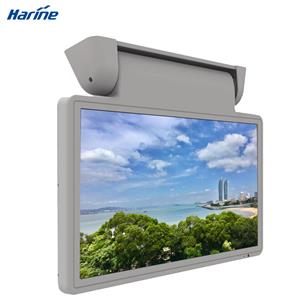
For example, Harine’s 18.5 Inch Fixed Bus LCD Monitor is designed for passenger information, onboard advertising, and multimedia communication in buses and coaches.
Flip-Down Bus Monitor
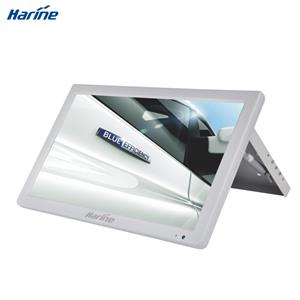
A flip-down monitor can be folded away when it is not being used. This helps reduce the amount of permanent space occupied inside the passenger cabin.
Manual and motorized versions are available for different coach projects. They are often used for passenger entertainment, video playback, travel information, and occasional content presentation.
For public transport systems that need information to remain continuously visible, a fixed display may be more practical. For tour buses and long-distance coaches that use screens mainly during selected parts of the journey, a flip-down design may provide greater flexibility.
Important Requirements for a Bus Passenger Information Display
Clear Visibility
Passengers may view the screen from different seats and angles. The display should therefore offer suitable brightness, contrast, resolution, and viewing angle for the cabin layout.
Screen size should be determined by:
Viewing distance
Number of passengers
Installation position
Amount of displayed information
Font and interface design
Available vehicle space
A larger screen is not automatically better. The display should fit the cabin structure without obstructing passenger movement, mirrors, emergency equipment, or other vehicle components.
Wide-Voltage Power Input
A bus electrical system does not provide the same stable power conditions as a building. Voltage can change when the engine starts, the alternator charges the battery, or other electrical equipment operates.
A vehicle display should support an appropriate input-voltage range and include suitable power protection. This helps reduce restarting, flickering, unstable images, and component damage caused by electrical fluctuations.
Resistance to Vibration
A bus passenger information display operates while the vehicle is moving. Road conditions, acceleration, braking, and engine vibration can affect the screen, connectors, mounting structure, and internal components.
The monitor and installation bracket should therefore be designed for vehicle use. Secure mounting is essential for both display reliability and passenger safety.
Anti-Interference Performance
Buses contain multiple electronic systems, including cameras, media players, communication equipment, lighting, control systems, and charging devices.
Electromagnetic interference or unstable signal transmission may affect image quality. A properly designed vehicle display system should use suitable interfaces, cables, grounding, shielding, and power protection.
Long Operating Hours
Public buses, airport shuttles, school buses, and long-distance coaches may operate for many hours each day. Their displays may continuously show route information, announcements, or advertising.
The LCD panel, LED backlight, power circuit, and thermal structure should be suitable for the expected operating schedule. System designers should also consider ventilation and heat dissipation around the monitor.
Suitable Input Interfaces
The required interface depends on the passenger information controller, media player, or onboard computer.
Possible signal inputs include HDMI, VGA, DVI, RCA, or customized interfaces. Before ordering, buyers should confirm:
Output interface of the content source
Required resolution
Signal format
Cable length
Connector type
Audio requirements
Available installation space
An interface name alone does not confirm complete compatibility. The display and content source should be tested together before mass installation.
Content Used in Passenger Information Systems
A bus information screen can support several types of content.
Route and Stop Information
The screen can show the current route, next stop, final destination, transfer points, and other passenger guidance.
Clear text size, strong contrast, and a simple information hierarchy make the content easier to read from different positions.
Safety Announcements
Displays can present emergency instructions, seat belt reminders, exit information, prohibited activities, and other safety messages.
Visual information can complement audio announcements, particularly in noisy environments.
Onboard Advertising
Commercial advertising can be combined with route information or played during suitable periods. This creates an additional communication channel for transport operators and advertisers.
Entertainment Content
Long-distance coaches and tour buses may use the same onboard display system for movies, destination introductions, travel information, or other entertainment programs.
Fleet and Service Messages
Operators can show service updates, temporary route changes, welcome messages, passenger notices, and company information.
Integration with a Bus Media Player
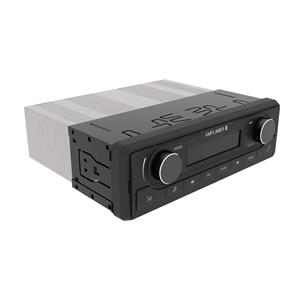
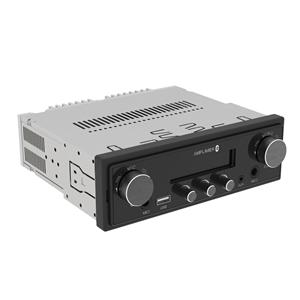
The passenger information display normally requires a content source. A bus media player can store and play images, audio, and video, while a more advanced controller may receive real-time information from the vehicle or transport management system.
Before integration, buyers should verify:
Display resolution
Media format compatibility
Signal output
Automatic power-on requirements
Content update method
Audio output
Multi-screen synchronization
Remote management requirements
The monitor, player, cables, power system, and software should be evaluated as one complete solution rather than as separate products.
Questions to Confirm Before Ordering
Before purchasing a bus passenger information display, project teams should confirm:
Where will the screen be installed?
What is the expected viewing distance?
Which screen size fits the cabin?
Is a fixed or flip-down structure required?
What content will be displayed?
Which interface does the controller or player provide?
Is audio output required?
What is the vehicle’s nominal voltage?
How many hours will the display operate each day?
Are customized brackets, housings, cables, or interfaces needed?
Does the project require OEM, ODM, or SKD support?
How many screens will be installed in each vehicle?
Providing this information helps the display supplier recommend a more appropriate configuration and identify possible integration issues before sample testing.
Bus Display Solutions from Harine
Xiamen Harine Technology Corporation Limited develops and manufactures vehicle display and multimedia solutions for buses, coaches, trucks, trains, and other commercial vehicles.
Available solutions include fixed bus LCD monitors, manual flip-down monitors, motorized monitors, advertising displays, media players, cameras, and related vehicle electronic products.
Depending on the project, Harine can support different screen sizes, installation structures, input interfaces, power configurations, cables, colors, and other OEM or ODM requirements.
Contact Harine to discuss your bus passenger information display project.
FAQ
What information can a bus passenger information display show?
It can show route numbers, destinations, upcoming stops, transfer guidance, safety announcements, service messages, advertising, images, and video. The available content depends on the connected controller, media player, and software system.
Is a passenger information display the same as a bus television?
Not exactly. A bus television is mainly associated with entertainment, while a passenger information display focuses on communicating route, service, safety, or operational information. One onboard screen may support both functions.
What screen size is suitable for a bus?
The appropriate size depends on the installation position, passenger viewing distance, cabin dimensions, and amount of information displayed. Common projects may use different sizes at the front, middle, or rear of the vehicle.
Can one media player connect to multiple bus screens?
It may be possible depending on the player output, signal distribution method, interface, cable length, and required content. The complete system configuration should be confirmed before installation.
Why does a bus information display need wide-voltage input?
Vehicle voltage can fluctuate during engine starting, charging, and operation of other electrical equipment. Wide-voltage support and power protection help the display operate more reliably under these conditions.
Can the mounting structure be customized?
Yes. Depending on the vehicle interior and project quantity, roof mounting, wall mounting, rear mounting, brackets, housings, cables, and other structural details may be customized.